How does Qeepsake know which journal to assign my entry to?
Questions: Question prompts that you receive from Qeepsake are assigned to your child’s journal specifically. These entries are not able to be switched over to other journals because of that reason. If your response includes the names of your other kiddos, the entry will only be saved to the journal that the question was designated to. For example : What is something brave that Freddy has recently done? This response will be saved to Freddy’s journal.
If your response include your other kiddos, you would can save that entry as a spontaneous entry. You would simply copy that same entry and paste the response into a ‘spontaneous entry’ on your other child’s journal, then you can save that entry to their journal as well!
Spontaneous Entries: To assign a spontaneous entry to a journal, Qeepsake looks for any of your journal’s or children’s names in each text you send and will automatically attach it to the corresponding journal.
If more than one child's name is mentioned, the journal entry will get duplicated to each journal. This only applies when sending in a spontaneous entry.
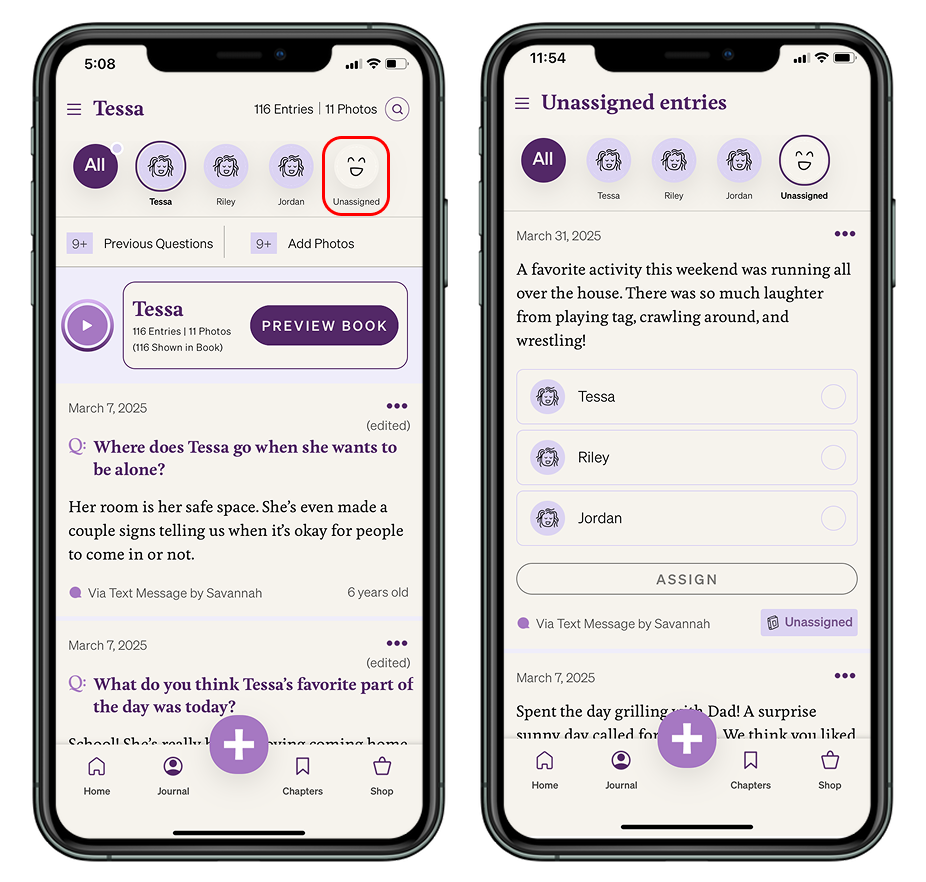
If Qeepsake doesn't see one of your journal names or child names in the entry sent, the journal entry will be stored in an unassigned folder. If you do not see an unassigned folder, this means that you do not have any unassigned entries.
Keep in mind that you cannot send a spontaneous entry via SMS text until you have answered or skipped all of the day's questions.
Where to find your unassigned entries in the mobile app:
You can review, edit, and reassign your unassigned entries by clicking on the 'Unassigned' Icon in your app dashboard or home screen.